Invoicing
From unbilled hours and reimbursable expenses to a client-ready PDF — with the billing math explicit and the history immutable.
How an invoice is built
invoice create gathers the client's uninvoiced, billable entries and
expenses in the period. Time entries group into line items — one per
project per day (e.g. "API Rewrite — 3 entries"). Each line's duration is
rounded per your billing config, priced at the
resolved rate, and the
rate is frozen onto the invoice so later rate changes never rewrite history.
Expenses add as separate reimbursable lines — untaxed, pass-through amounts frozen at invoice time. An invoice with only expenses (no time) is valid.
The invoice's stored period is derived from the actual line dates (min–max
of time work_date and expense incurred_date), not necessarily the window
you requested. Requesting last month but only billing June 16–30 records
June 16–30 on the invoice.
Creating an invoice
$ ttd invoice create --client acme-corp              # last calendar month
$ ttd invoice create --client acme-corp --month 2026-05
$ ttd invoice create --client acme-corp --from 2026-05-15 --to 2026-05-31
$ ttd invoice create --client acme-corp --period "last month"
$ ttd invoice create --client acme-corp --period "2026-05-01 to 2026-05-31"
$ ttd invoice create --client acme-corp --period "last two weeks"
$ ttd invoice create --client acme-corp --period "june 16 to june 30"
$ ttd invoice create --client acme-corp --number 2026-CUSTOM-1
--period accepts the same strings as the TUI invoice wizard:
last month(default),this month,this week,last weeklast <N> days|weeks|months(e.g.last 14 days,last two weeks)YYYY-MM,YYYY-MM-DD to YYYY-MM-DD- Month-name ranges:
june,june 2025,june 16 to june 30,june 16–30
-i opens a form with a live total preview instead.
Preview with --dry-run
Prints time lines, expense lines (when present), subtotal, tax, expenses
subtotal, and total — and changes nothing. When tax.set_aside_rate is set,
the preview also shows how much to set aside and the estimated take-home
(subtotal minus set-aside).
Reimbursable expenses
Expense lines appear in a separate section on PDF and Markdown renders. They are not taxed — tax applies only to the time subtotal:
Log expenses with ttd expense or the TUI (l → expense).
Attach receipts via the CLI; embed them in the PDF with --receipts on
create or render (see below).
Rendering PDF and Markdown
Render at creation time with --pdf and/or --md, or any time later:
$ ttd invoice create --client acme-corp --pdf --md
$ ttd invoice render 2026-001                 # re-render both
$ ttd invoice render 2026-001 --pdf --out ~/Desktop
$ ttd invoice render 2026-001 --pdf --receipts  # append expense receipt pages
--receipts merges receipt files into the PDF after the invoice page. When
invoice.attach_receipts is true in config,
receipts are included by default. Markdown cannot embed receipts — ttd refuses
--md when receipts would be included.
Files are named {number}-{client-slug}.pdf / .md and written to
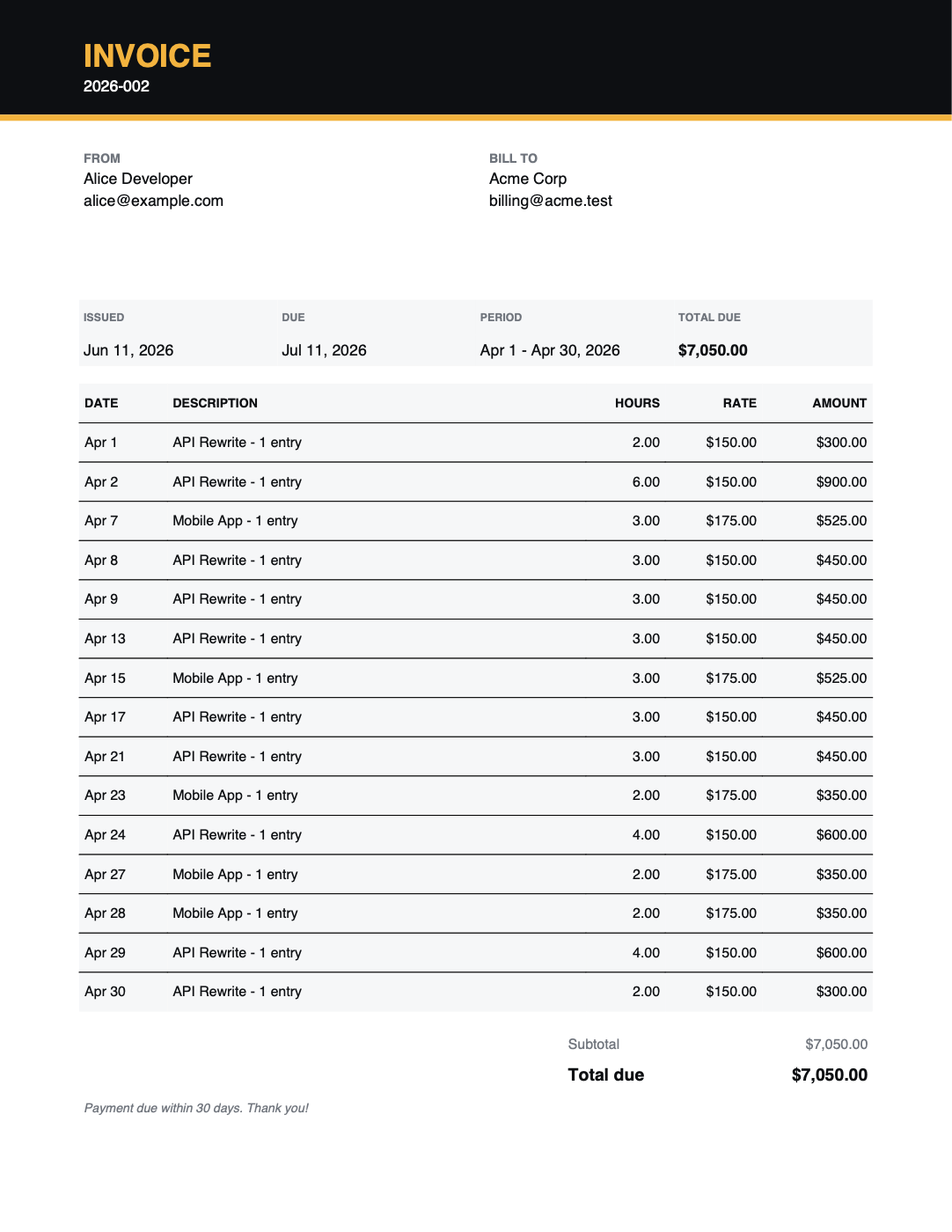
invoice.output_dir (~/Documents/invoices by default). The PDF is a clean
single-page letterhead layout; the Markdown comes from a template, handy for
pasting into email or converting with pandoc.
The invoice lifecycle
| Status | Meaning |
|---|---|
draft |
Created; entries and expenses are locked to it |
sent |
Issued to the client |
paid |
Payment received — tax set-aside is frozen at this moment |
void |
Cancelled — its entries and expenses are released for re-invoicing |
$ ttd invoice mark 2026-001 sent
$ ttd invoice mark 2026-001 paid --paid-date 2026-06-09
$ ttd invoice mark 2026-001 void
--paid-date defaults to today; correcting it re-freezes the set-aside into
the right tax quarter. Voided invoices keep their number forever — numbers
are never reused.
Reviewing invoices
$ ttd invoice list            # newest first: number, client, period, total, status
$ ttd invoice show 2026-001   # time line items, dates, subtotal/tax/total, set-aside
$ ttd invoice show 2026-001 --format md   # rendered Markdown to stdout (preview)
invoice show --format md prints the same Markdown the TUI preview (m) shows,
without writing a file — use invoice render --md when you want files on disk.
The default table format lists time lines only; expense lines appear in
--format md, TUI detail (o), and rendered PDFs
(#17).
When tax.set_aside_rate is greater than zero, invoice list also shows
Est. Tax and Take-Home columns. Unpaid invoices preview at the current
rate (shown muted); paid invoices use the frozen snapshot from when they were
marked paid. With the rate at 0 (the default), those columns are omitted.
invoice show includes the same set-aside and take-home figures — a preview
for open invoices, frozen amounts for paid ones.
Invoice numbering
Numbers come from the invoice.number_format template — default
{year}-{seq:03d} → 2026-001, 2026-002, … The sequence increments within
whatever fields you use:
Available fields: {year}, {month}, {seq}.
Customizing your invoices
All in config:
user.name/user.email/user.address— the FROM blockinvoice.payment_terms_days— due date, 30 days by defaultinvoice.tax_rate— tax added to the subtotal, as a fraction (0.08= 8%)invoice.output_dir— where rendered files goinvoice.attach_receipts— default--receiptson renderbusiness.currency(and per-client currency) — amounts and symbols
Billing rounding
Rounding applies to each line item's rolled-up daily duration:
billing.increment_minutes— the granularity, 15 minutes by defaultbilling.rounding—nearest(default),up, ornone
A project-day totalling 1h07m bills as 1h00m with nearest, 1h15m
with up, and exactly 1h07m with none. What you log is never changed —
only what's billed.
Refreshing an invoice
Recompute an existing invoice from its locked entries and expenses using current billing rules, rates, tax config, and description logic (including entry notes). Preview shows a before/after diff; nothing changes until you confirm.
$ ttd invoice refresh 2026-001              # print diff
$ ttd invoice refresh 2026-001 --apply      # apply when allowed
The CLI shows expense subtotal changes when they differ. The TUI refresh modal does not yet (#21).
| Status | Preview | Apply |
|---|---|---|
void |
Blocked | — |
draft, sent |
Full recalc diff | Updates lines and invoice totals |
paid |
Full recalc diff | Descriptions only — apply is blocked when totals or line amounts would change |
Paid invoices never update set_aside, paid_date, or header totals. To change
billing on a paid invoice, void it and re-invoice.
Refresh does not pull in new uninvoiced entries or edit locked entry data.
Invoices in the TUI
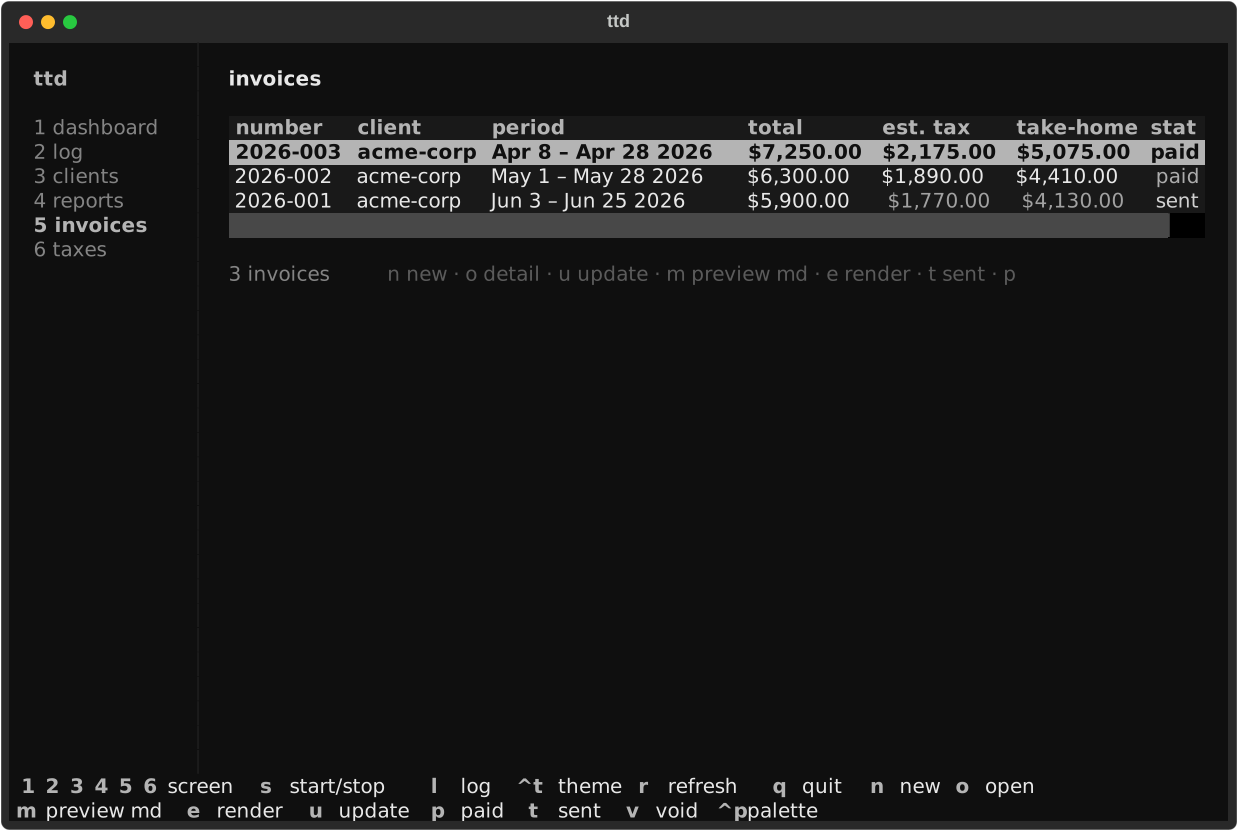
Screen 5 lists invoices with status pills. When a tax set-aside rate is
configured, the table also shows est. tax and take-home columns (dim
for unpaid previews, normal for paid). The detail modal (o) shows time and
expense line tables plus est. tax / take-home when configured.
| Key | Action |
|---|---|
n |
new invoice (pick client, live-preview period and expense lines) |
o |
open detail (time + expense tables) |
u |
refresh — recompute from locked entries (before/after diff) |
m |
preview the Markdown render |
e |
render format modal — receipts / PDF / Markdown checkboxes |
t / p / v |
mark sent / paid / void |
The render modal (e) lets you choose whether to embed expense receipts in
the PDF. Receipts and Markdown are mutually exclusive, matching the CLI.